I don't really want to start writing blogs if I can't be vulnerable. Art is the biggest insecurity I have about the project right now, so let's rip that band-aid off early.
Struggling with Art
I have confidence in my abilities to work through the technical problems in my project. Design is an area I certainly haven't vetted myself outside of a few game jams, but I do have confidence in my vision and that the building blocks that compose it will strengthen over time through playtests and iterations. I find myself setting up infrastructure, optimizations, test flows, and robust systems probably more than I should at this stage of the project. Well, certainly more than I should. These are the things I absolutely love to do. My brain gravitates toward these types of problems and accomplishing each one has a tangible impact on the project.
Art has never felt the same to me. I believe it's because the art of a project can't be carried by a small set of well made assets. Art needs consistency and quantity. I've spent time learning character animations, VFX, hard surface modelling, rigging, skinning, and a good chunk of time researching color theory and materials. After each of these stints I walk away with some valued skill development but the impact on the project has always felt minimal (except for color theory, that was surprisingly impactful for a surprisingly little amount of research). Of course, the learning phases of all of these are expected to take a while. No artist is going to say their craft should be learnable in a week. And once you learn it and develop familiarity with it you get faster, better, and more creative. But while I love learning these things, the cost has been a little too great for too little reward. Atma has an insane technical scope and it needs all the attention it can get.
So while early on in the project I had a goal of learning everything and doing everything myself, that goal has slowly transformed into a reality where Atma becomes a team project. I want to hire artists. I miss working with artists. I miss working on teams in general. One of the hardest parts about solo development is not being able to share the small wins with anyone. And I somewhat selfishly love helping artists with their workflows. I love bringing them performance reports, adding new tools, or hooking their new assets up and sending them gifs of their creation coming to life. When I was in college I would break out Unreal's sequencer and take cinematic shots of the assets my artists would create. There's something extremely fulfilling about that moment when engineering talent and artistic talent complete each other.
When I first started acknowledging the art struggles I recruited my friend John Khaw (check out his ArtStation here) to do some hard surface modelling for me. I loved these days on the project. John always produced incredible work and would get fascinated by underexplored (by us) technologies like tessellation and triplanar materials. A style was developing for Atma and it was one I was very excited by. But the technical and design side of the project couldn't keep up with how fast John worked. I simply didn't have answers for what assets we needed next. John's involvement in the project ebbed and flowed. It felt bad asking him to make things that I wasn't sure were going to stay around and it felt bad giving him only one task for the week.
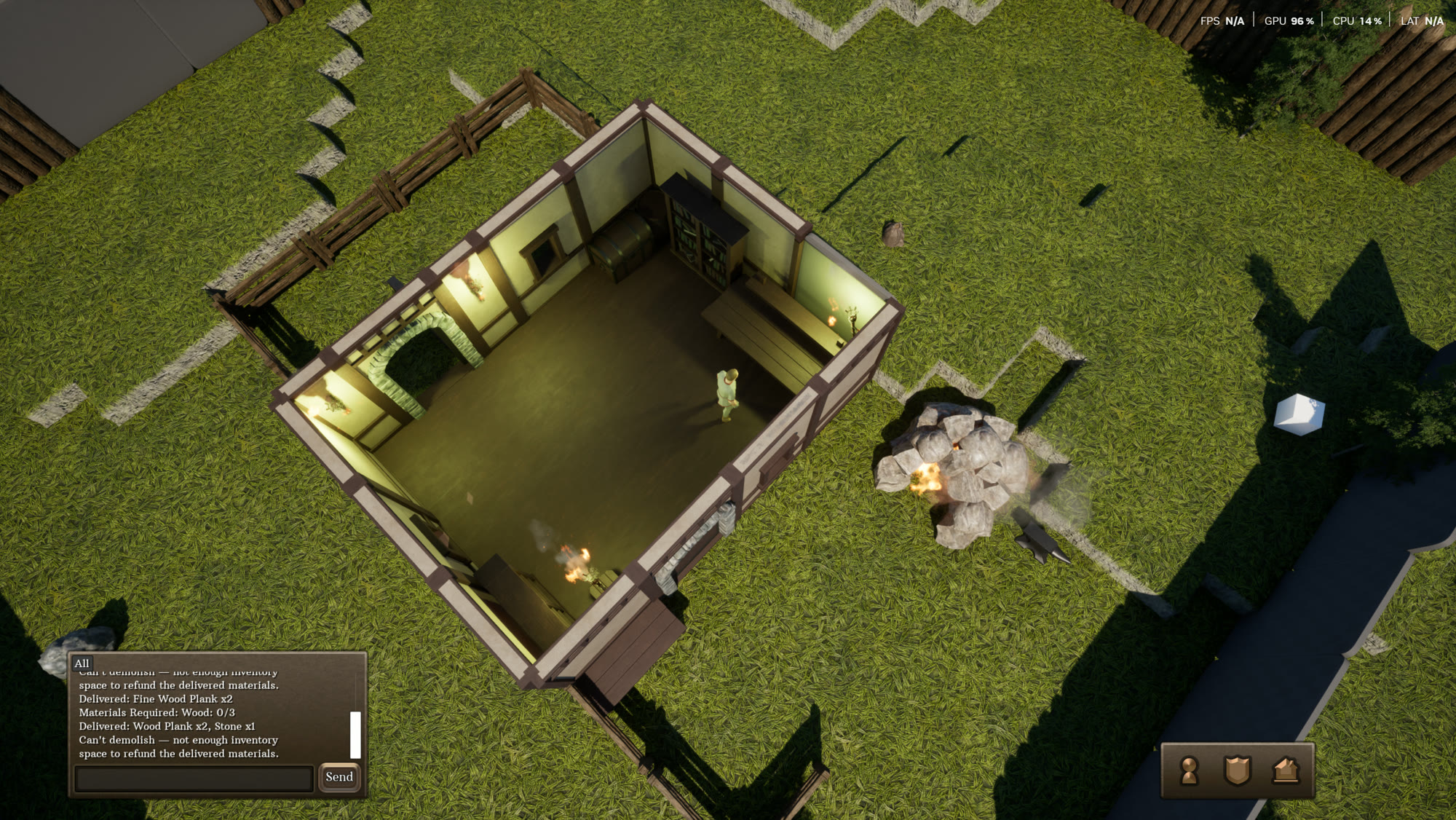
I started looking for other solutions to get me through development. It was also important to recognize that there were a number of neglected art disciplines on the project that still needed attention. Animation, VFX, character modelling, UI, lighting, and sound were all things I knew the project needed but simply didn't have an answer for yet. I started trying to purchase some asset packs online to help out but try as I may, they always created noticeably disjoint art styles that I felt didn't really improve the project. They certainly didn't hold up over time when I needed a new element the packs didn't include. So after a few underwhelming purchases I got back to the drawing board.
Animation
Animation was probably the biggest windfall of the project so far. Character animation can be incredibly tricky. I spent a few days working with Unreal Engine 5's Control Rig and actually made a few animations I was pretty happy with. They weren't perfect, but for a learner they showed promise. They were polishable. However, they took a long time and the more time I spent tweaking keyframes and solving rotation issues, the more tired I grew of it. It's a skill I've visited a number of times in my career and have simply never been able to stick with. But a happy accident of the new direction of the game meant it didn't really require as much attention on characters. Ships have much more rigid and simple animations. A lean into a turn, a quick slingshot of a cannon firing, and the rising and falling of sails might be all the ships ever need. Of course we'll still have to figure things out for sea creatures and land animations, but a large class of high visibility animations was somewhat removed.
Then Unreal 5.8 came out. Unreal 5.8 introduced its new markerless mocap (motion capture) system. If you've ever seen people wearing the dark body suits with white balls on them to record game or movie animations, that's what mocap is. The white balls are the "markers" and serve as high contrast points for software to track motion between frames. Each frame the software compares the location of the white ball with the corresponding white ball in the previous frame and uses this to calculate animation data. It usually requires a decent amount of cleanup after the fact to correct issues and make it game ready, but it's been a popular industry tool for a long time now. It's also usually very expensive limiting its access to indie developers like myself. Unreal's markerless mocap gets rid of the need for fancy equipment and dressing up in ping pong balls. It leverages machine learning to produce animation data from a simple recorded video. Of course, when machine learning (AI) enters the conversation around games it should stir up some controversy and it did. This made me a bit hesitant to use it at first so I did some research. The general consensus online seems to be that this could have easily just been trained on videos of human motion more than hand crafted animations and thus didn't strike the same chord as things like generative 3D models or sprites. Do we really know though? It's hard to say. And there are still ethical and artistic concerns around replacing a trained animator's touch. I want to write a whole post about my opinions on AI and where I believe it belongs (and mostly doesn't belong) in games soon. So I'll save the tangent I'm heading down for when that time comes. For now, it's a fun tool to explore and it definitely solves the humanoid animation problem. I've tested it out and gotten some pretty great results. I haven't yet attached it to any gameplay logic though.
User Interface
User interface was one of the areas I tried purchasing packs online for. Unfortunately, I couldn't get something I enjoyed looking at for more than a week. There was also a glaring issue which is that no pack really had everything I needed. One pack might have my UI toggles and buttons and the other one might have the right button styles or progress bars. "Why not pick both?" was shut down by style concerns. It was extremely difficult to find multiple UI packs that matched in style outside of pixel art.
So I started looking at procedural UI. A while back I was inspired by Unreal's video on the UI Material Lab. This is a set of assets that uses math to create user interface materials. You can create rectangles with rounded borders, soft gradients, animated spinners, sheens, and a ton more with just math. The math isn't really simple, but I've always found math fascinating. The first time I tried to use it I found it quite confusing. And honestly, I still do. I often times know generally what I want but the math to get it done is quite complicated. Thankfully, Claude is really good at math. So this is an area where AI has touched art indirectly. I had Claude write my own set of material-lab-style functions to render my UI with rounded borders, dirt, wood grain texture, and simple animations. It exposes a set of parameters for me to tweak and find my style and the output isn't half bad. It's not generating the textures or assets being used, but it is writing the shader code that renders it all. It lacks embellishments and that hand-crafted feeling that we see in most user interfaces which makes it considerably less appealing.
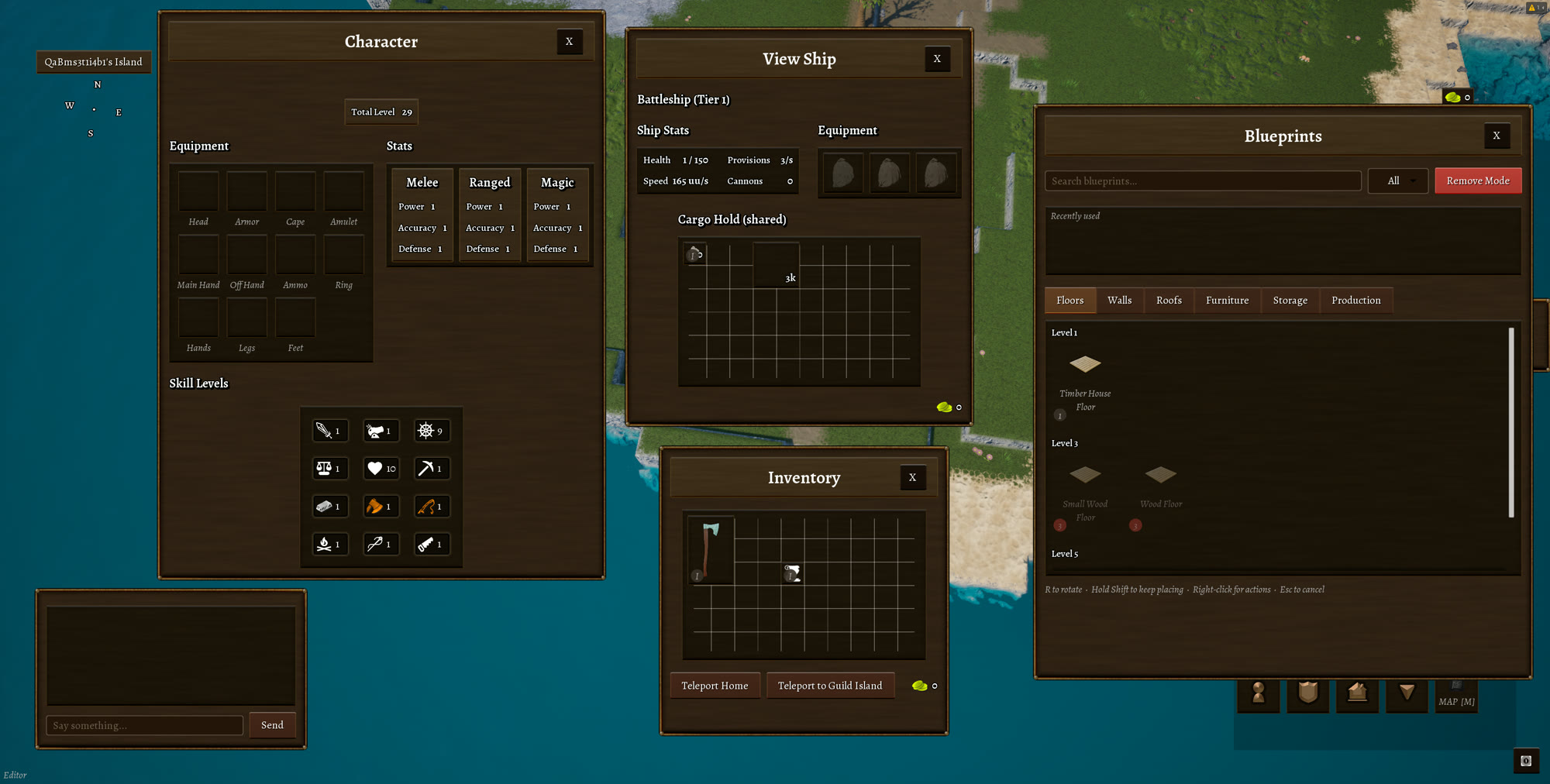
Do I love it? Nope. But it's consistent and fast to iterate on. I've accepted that this is a great way for me to work through prototype UI. The dream is still to hire a UI artist. I've actually started looking around already but, like with most art, the project is still shifting too much to really leverage someone dedicated to UI art.
As a quick aside, I should mention item icons. Games like this have tons of items and each one needs its own icon. My temporary prototype solution has been to simply render the 3D models and use that as an icon. This has some challenges. The first is that it usually looks bad. Realistic lighting on models rendered on top of the simplistic UI panels I've created is a definite style clash. I alleviated this a little bit by applying a shader to the rendered output to tweak colors, flatten details, and add a gentle outline. This helped and for now works as my prototype workflow but it's not ideal long term. The second is that it only works if I have an actual model for the asset. With the ForgeScript tool I mention later on, this problem is mitigated slightly but in all honesty a lot of my UI icons are placeholder art at this stage.
VFX
Gotta be honest, I've hardly touched this. I did spend a day or two working through Niagara fundamentals and quite a bit of time discussing VFX with a good friend of mine Luke Mason (Senior VFX artist at Blizzard, check out his ArtStation here), but I've mostly set it aside for now. While I actually really enjoy VFX, it's another area where the time invested isn't paying off quite yet. In the meantime, check out this RuneScape inspired fireball thing I made:
Modelling
Modelling is a major area I'm still very shaky on. This is probably where I toed the line the closest to AI art on the project. Before the pitchforks come out though I just want to be very clear about my intentions. Not a single model or texture on Atma is generated by AI. A good chunk of them were hand modelled by John Khaw, but to expedite my prototyping phase I started experimenting with something I call ForgeScript. ForgeScript is a small Unreal module sitting on top of their mesh authoring tools. It leverages some existing tools and adds some of its own to push a concept of "art as code". The idea was that I could quickly have Claude write code scripts that deterministically create models with tweakable parameters that can be shared between assets to maintain consistency. Imagine creating a sword with something like this:
sword_blade = new cube()
sword_blade.set_scale(20, 5, 80)
sword_blade.pinch(0, 0, 80, 5)
sword_blade.attachment = new attachment("BladeBase", 0, 0, 0)

sword_handle = new cylinder()
sword_handle.set_scale(15, 8, 20)
sword_handle.attachment = new attachment("HandleTop", 0, 0 0)

attach(sword_blade, "BladeBase", sword_handle, "HandleTop")
This is super rough, but hopefully it illustrates the vision. Now, ForgeScript didn't come out quite like that. Here's an actual ForgeScript file in full for the arming sword.
"""A simple one-handed arming sword: straight double-edged blade with a central
fuller, plain bar crossguard, oval leather grip, crescent "cocked hat" pommel.

Layout: +Z from pommel to tip, origin at the blade/guard junction.
Blade width runs along Y, thickness along X.
"""

import forge as f

ASSET_NAME = "SM_Forge_ArmingSword"
ASSET_FOLDER = "Weapons"
MAX_TRIANGLES = 4000

# Zoomed preview of the hilt (guard/grip/pommel) — whole-sword framing makes
# this region too small to review. center is normalized within the mesh bounds.
PREVIEW_CLOSEUPS = [
    {"name": "hilt_closeup", "center": (0.5, 0.5, 0.09), "radius": 0.24},
]

BLADE_LENGTH = 78 * f.cm
BLADE_WIDTH = 5.4 * f.cm
BLADE_THICKNESS = 0.85 * f.cm
FULLER_DEPTH = 0.16 * f.cm

GUARD_SPAN = 19 * f.cm
GRIP_LENGTH = 11 * f.cm


def blade_profile():
    """Double-edged lens cross-section with a fuller groove on both faces.
    Profile X = width, profile Y = thickness."""
    w = BLADE_WIDTH * 0.5
    t = BLADE_THICKNESS * 0.5
    floor = t - FULLER_DEPTH
    return [
        (-w, 0.0),
        (-0.42 * w, t), (-0.16 * w, t),
        (-0.10 * w, floor), (0.10 * w, floor),
        (0.16 * w, t), (0.42 * w, t),
        (w, 0.0),
        (0.42 * w, -t), (0.16 * w, -t),
        (0.10 * w, -floor), (-0.10 * w, -floor),
        (-0.16 * w, -t), (-0.42 * w, -t),
    ]


def build() -> f.Part:
    # Blade root starts just inside the guard (guard spans z -0.55..1.35);
    # a deeper root pokes out visibly below the guard bar.
    blade = f.sweep_profile(
        profile=blade_profile(),
        frames=f.linear_frames(
            start=(0, 0, -0.4), end=(0, 0, BLADE_LENGTH),
            scales=[
                (0.00, 1.00, 1.00),
                (0.15, 0.97, 1.00),
                (0.30, 0.93, 0.97),
                (0.45, 0.88, 0.93),
                (0.60, 0.84, 0.88),
                (0.72, 0.79, 0.82),
                (0.84, 0.70, 0.72),
                (0.93, 0.50, 0.55),
                (1.00, 0.06, 0.10),
            ],
        ),
        material="Iron",
    )

    guard = f.box(size=(1.5, GUARD_SPAN, 1.9), material="Iron", at=(0, 0, 0.4))
    guard = f.bevel_all_edges(guard, distance=0.3)
    # Quillons sweep gently toward the blade, like the reference.
    guard = f.bend(guard, along="y", toward="+z", angle_deg=14)

    grip = f.cone(
        base_radius=1.5, top_radius=1.75, height=GRIP_LENGTH,
        material="Leather", radial_steps=12, at=(0, 0, -GRIP_LENGTH),
    )
    grip = f.scale(grip, (0.8, 1.0, 1.0))

    # "Cocked hat" pommel: a flattened mass bent into a clear crescent whose
    # tips curl up toward the grip.
    pommel = f.rounded_mass(half_extents=(0.95, 3.2, 1.7), material="Iron")
    pommel = f.bend(pommel, along="y", toward="+z", angle_deg=85)
    pommel = f.translate(pommel, (0, 0, -12.2))

    sword = f.combine([blade, guard, grip, pommel])
    f.set_anchor(sword, "hand_grip", position=(0, 0, -5.5), forward=(0, 0, 1))
    return sword
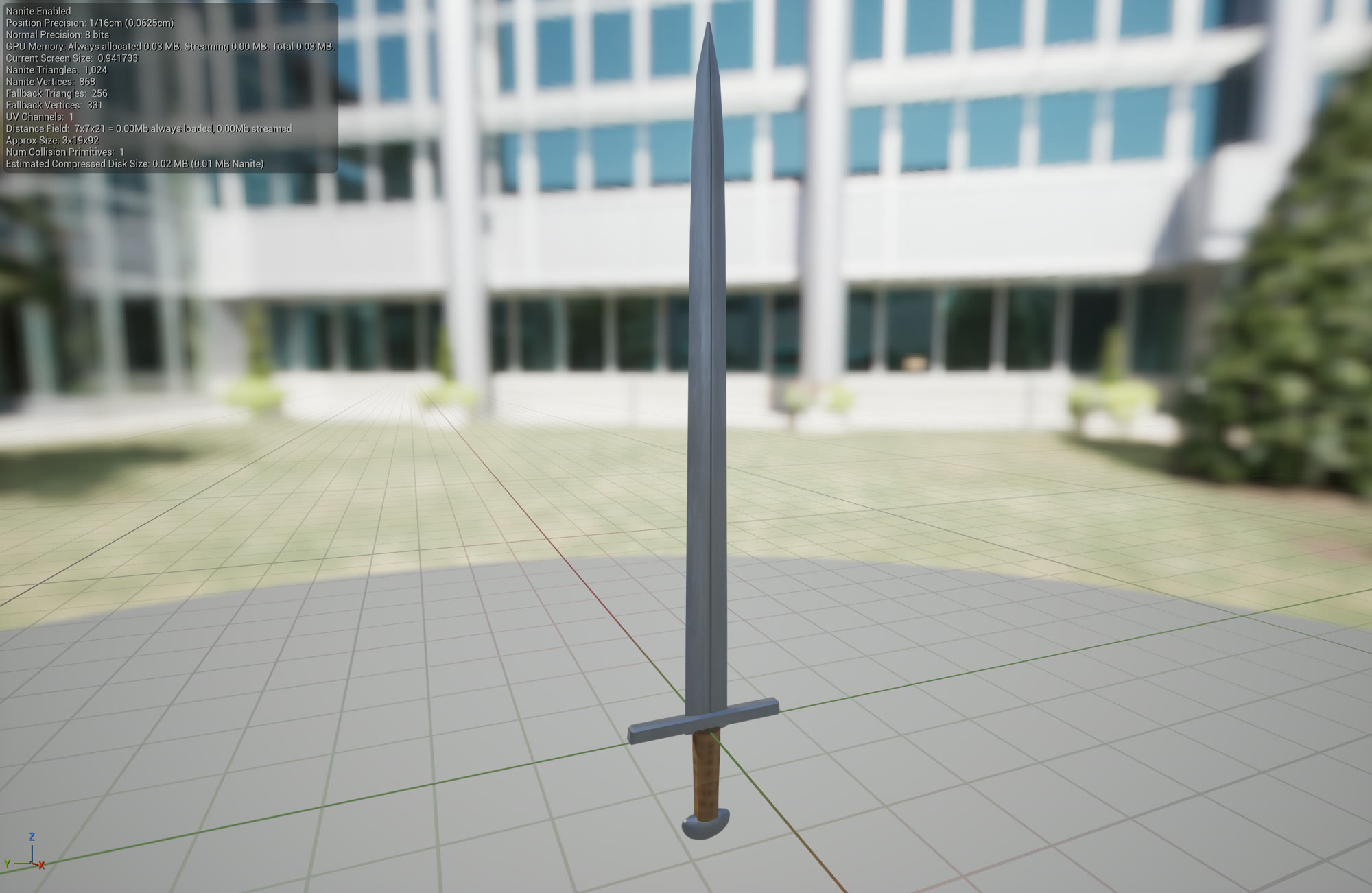
So you can see some of the spirit is there. It definitely needs a bit more work. But it actually worked as a proof of concept. You might also notice that it uses some helper functions to carry quite a bit of weight. By design, this allows other swords to reuse the same exact workflow when creating similar parts to help maintain style and reduce script complexity. Below is the output of that script.
Sound
Sound hasn't been touched yet in Atma. I did a bit of sound work on another project recently and quite enjoyed it. At the moment my plan is to use Soundly and Unreal's MetaSounds for the entire soundscape of Atma, but I'm not entirely confident that is going to hold up long term. We'll cross that bridge when we get there. But Soundly is an incredible program for anyone looking for high quality source sounds for a project. It can sometimes be tricky to get the exact sound you want but I'm not sure any source exists that doesn't have that problem. I'm planning on getting an initial sound pass done for the project within the next month or so. At this point the game is feeling a little dry from the lack of it.
Lighting
Lighting is another underexplored area of Atma. I'm currently using Lumen to light the scene which has been working pretty well so far. There are some artifacts but they are mostly noticeable around certain terrain textures which I've been phasing out. A bit of ghosting exists when characters move at low framerates too which does have me fairly concerned. Performance-wise things seem fine but my 3070 isn't exactly the min-spec video card. Thankfully no performance issues have really shown up in playtests.
In terms of style I've struggled quite a bit to get a lighting style that I really like. I added the Ultra Dynamic Sky plugin because I find its default lighting settings to be pretty appealing. The idea of adding weather to the game at some point is also interesting but it's not really a critical path at the moment and raises some design questions around syncing weather between islands and their seas. Simply adding Ultra Dynamic Sky didn't really get us somewhere I was happy with. Lately I've started researching color theory and how lighting can affect your color composition. Tweaks in material colors around the world have helped a lot but we still aren't where we would like to be. Many shadows are too dark and certain areas of the game still feel washed out, but I'm not entirely convinced it isn't a material or mesh problem yet. Overall we have a lot of work to do on lighting to get Atma looking nice and eye catching.
Looking forward
So right now a lot of Atma's art is in a prototype proof of concept phase. My dream is to be able to hire some artists to replace my temporary work and fill this world with something really beautiful. In the meantime, my goal is to make things functional and look decent enough to not detract from the experience. I've set aside a little money for when the time comes that I can provide artists with a real asset list, but I'm trying to be conscious about the current content and design churn and not commit to anything until things are in a stronger position. I have no intentions of ever using AI to generate art assets, but will definitely be leveraging it to create systems that support art. I like working with people too much. I want to be back on a team. I'm excited to someday compose that team of artists that can really bring life to Atma.