One of the infamous parts of creating an MMORPG is managing the networking behaviors. Whether it be a horde of 100 clients connecting at the same time or a large guild overwhelming your servers by all fighting in one area, there are a number of problems that can be extremely difficult to test on your standard home setup. And let’s say your home setup could support 500 of your own clients, you still need a way to give those clients instructions. I won’t claim that I can give you a comprehensive overview of all the testing methods out there. I can’t even defend that the ones I have chosen are the most efficient. But I can share how my initial attempt at this problem is shaping up today and some of the insights it's already given me.
Yesterday was my first time attempting to connect 100 clients at once to my game servers. The fact that I could even perform that test was extremely exciting and the results were relieving to say the least. One of the scariest parts of this whole “indie MMORPG” adventure is finally getting answers.
Scale Testing in Atma
Atma employs a few different types of automated tests. Considering how fascinated by testing I am, I’m sure this won’t be my last post on the subject. To keep this post simpler than my brain wants it to be, I’m just going to focus on the scale testing I'm currently working on.
I’ve been excited about scale testing since the start of the project and had to show a lot of restraint to not implement it in the first month. Nowadays it actually answers critical questions and gives the project some much needed technical validation. The scale test orchestrates tens to hundreds of clients at a time and pushes commands to them to control their behavior in game. The most critical areas I’m looking at today are the login flow and major performance markers.
Today's Test
To perform this scale testing I’ve augmented my existing development tool AtmaSuite with a section dedicated to this type of test. The general goal of the scale testing is to allow for quick bring up of many Unreal clients and to coordinate their behaviors. Unreal clients are a bit heavy though. A piece of me considered creating minimal fake clients that just did the login flow, but using legitimate Unreal clients was both simpler and allowed me to create actual connections and handle real Unreal RPCs between client and server. It meant my server was none the wiser that it was working with bots and could test real gameplay against my servers which was critical for real performance testing.
The Goal: connect 100 clients to a server, tell them to run around, and see what happens.
Setup
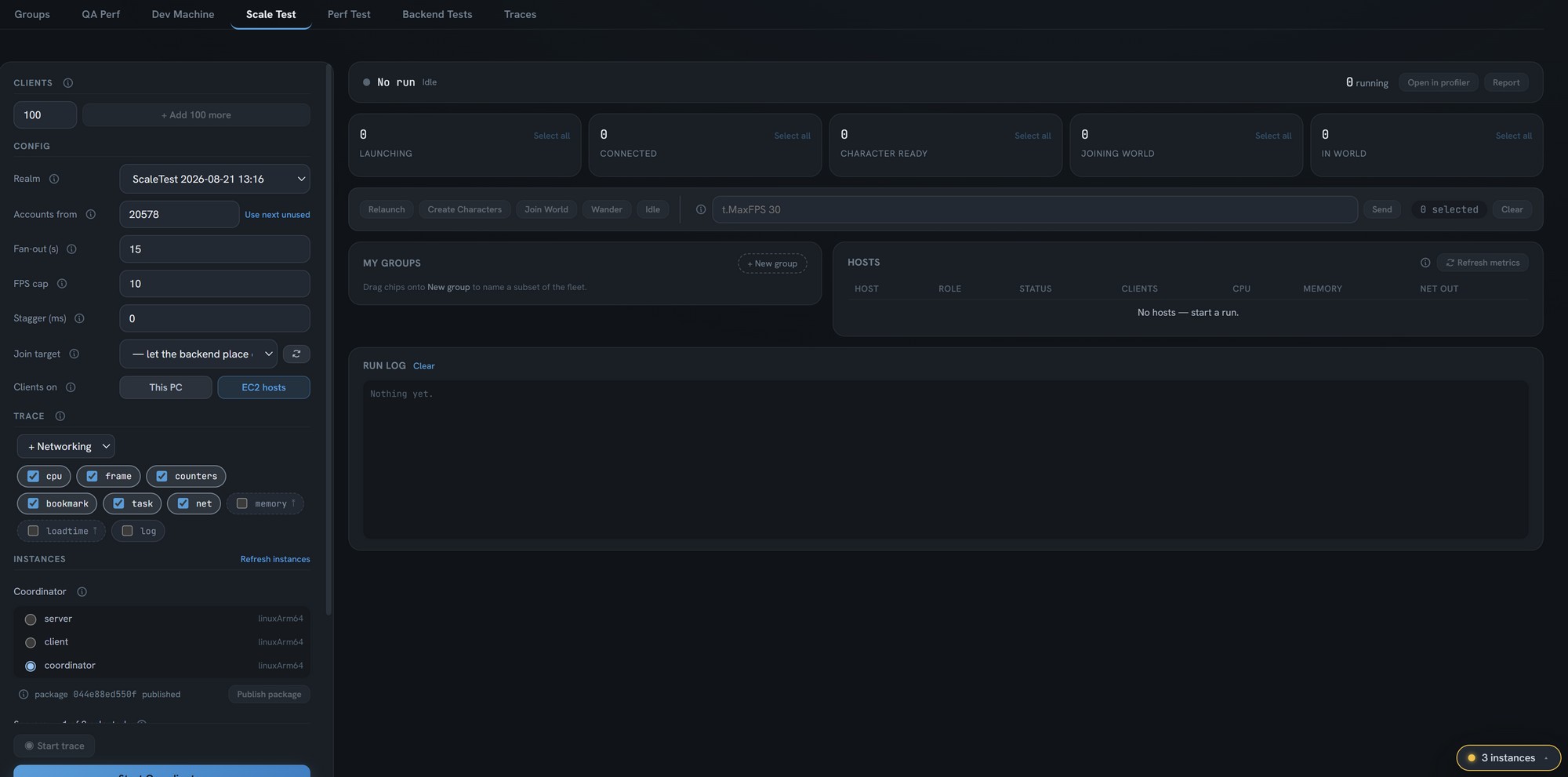
Today's test is going to have our servers using a test configuration. Real production servers will use a shipping configuration which should squeeze out some more performance for us, but strips a lot of valuable debug and performance metrics as well. It's also worth noting that this is one of my first times really stressing the Iris networking system which was moved from beta to production-ready in Unreal 5.8. I haven't been able to find a ton of metrics for it online so hopefully throwing my hat into the ring will help someone else similarly interested in the performance of Iris.
Here’s a quick rundown of the important parts of the scale test process which will hopefully make this admittedly overwhelming image a bit more clear.
- Select a realm or have a new one created for the test
- Set a fan out time, which gives each client a time window to perform their commands. Think “everyone create your character within 1 second” versus “everyone create your character some time in the next 30 seconds”.
- Set an island join target, which can allow me to funnel the new clients onto a specific island instead of going through the normal island assignment flow
- Choose if I want the clients hosted on my PC or on an EC2 instance
- Configure which insights trace channels I want running on my servers
- Select which EC2 instances are used to host my coordinator, the servers, and the clients.
- Click the start test button
For those unfamiliar with EC2, think of it as just a computer I can rent from Amazon.
Most of these settings are just reused from previous runs so starting a new test isn't actually that much clicking.
What is the Coordinator?
This section is a bit dense, but you aren't missing out on anything if you skip it unless you are interested in setting this up yourself.
The coordinator is a small application that each client and game server in my test connect to. The Unreal processes connect to it on startup and listen for commands they should be running. The coordinator is responsible for managing groups of clients and letting me know when a connection is lost or if a client has reported an error and the command was not properly handled.
When I run with local clients I run the coordinator on my own machine, but when running with clients on Amazon EC2 instances I run it on its own instance. This simplifies some connection behaviors. The Unreal processes are the initiators of the connection. When they sit on EC2 instances, that outbound connection to my computer would be refused due to a common router behavior known as NAT. There are ways around it, but they are additional complexities without much benefit. Initiating a connection from my machine to that one coordinator is trivial, and my current configuration for these EC2 machines eliminates the NAT concern all together. So the coordinator runs on its own instance.
Clients
Initially I ran with Windows clients. However, everything about it was worse than when I tested with Linux ARM64 clients. I’m not planning to support Linux clients on release, but since these tests are about the server and backend I had no issue using Linux clients for testing purposes. Thankfully, the only real blocker I had with ARM64 was that I needed to exclude some Steam modules from my build and then everything worked great.
The clients all run headless and seem to run without issue on ARM64 machines. Headless mode means it runs without any graphics which significantly reduces the amount of resources each client needs and eliminates some failure paths Linux typically encounters with games. It's worth mentioning that Linux ARM64 machines are also significantly cheaper in AWS. As a nice surprise, both the instance and my game processes seem to start up much faster (based on feel, not profiling).
Let's take a look at a run
For these tests I’ve used the following EC2 instances:
| Role | Instance | vCPU | RAM |
|---|---|---|---|
| Coordinator | t4g.nano | 2 | 0.5 GB |
| Game Server | c7g.medium | 1 | 2 GB |
| Clients (each) | r6g.2xlarge | 8 | 64 GB |

I start my run by simply configuring my settings. Yesterday I discovered that with large amounts of clients I actually have some issues in the character creation stage when I have fan-out set to five seconds. That’s potentially the first major discovery of scale testing! For this demonstration I’ll dodge that and use a 15 second fan-out, meaning every client will perform its action sometime within a 15 second window.
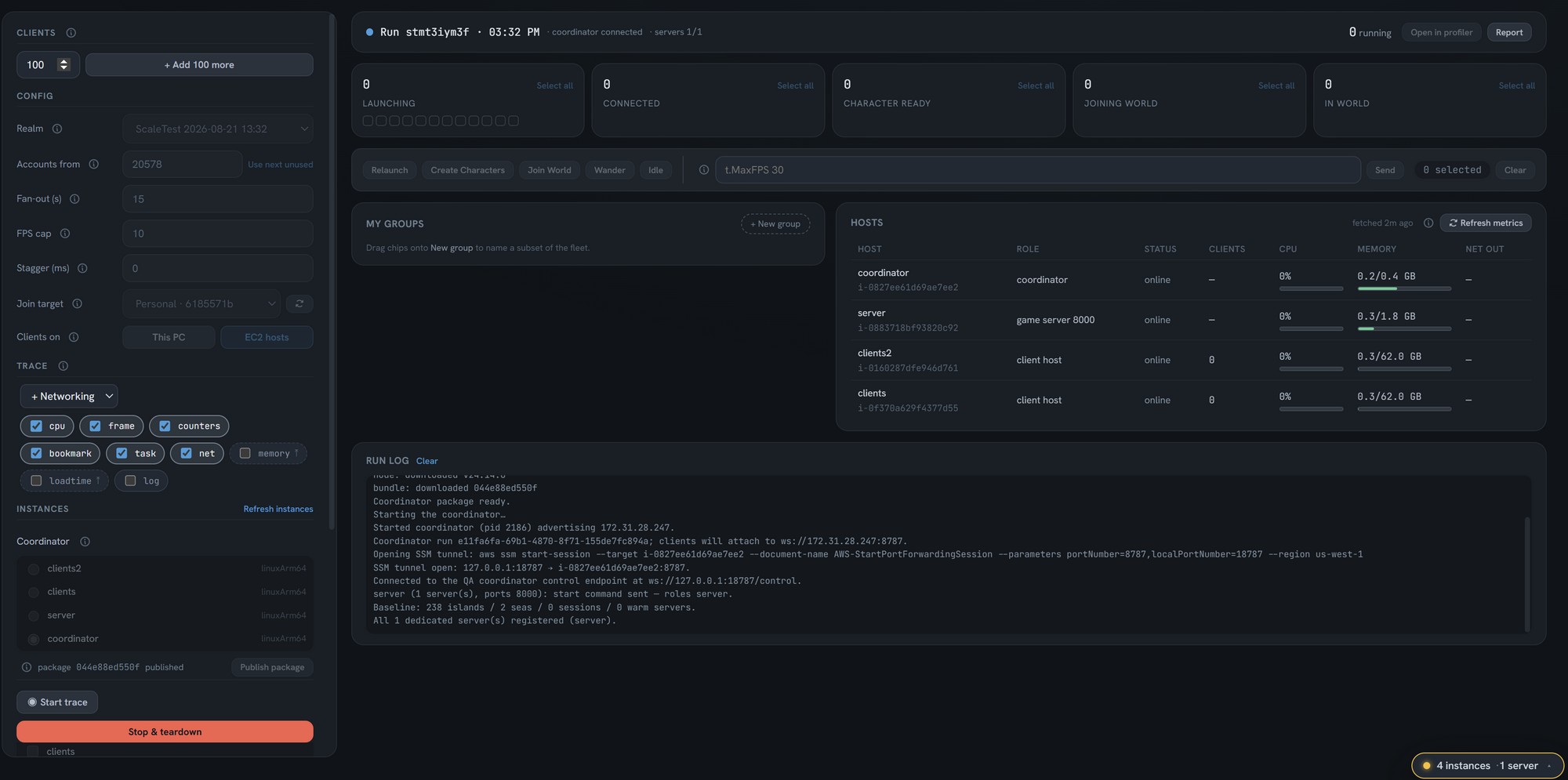
Once the clients are in the world we can do our first test. Let's start a trace, then set the clients to wander and see if we can capture this moment happening in Unreal Insights.
Traces are downloaded automatically after they are captured and made accessible through another panel in the app.
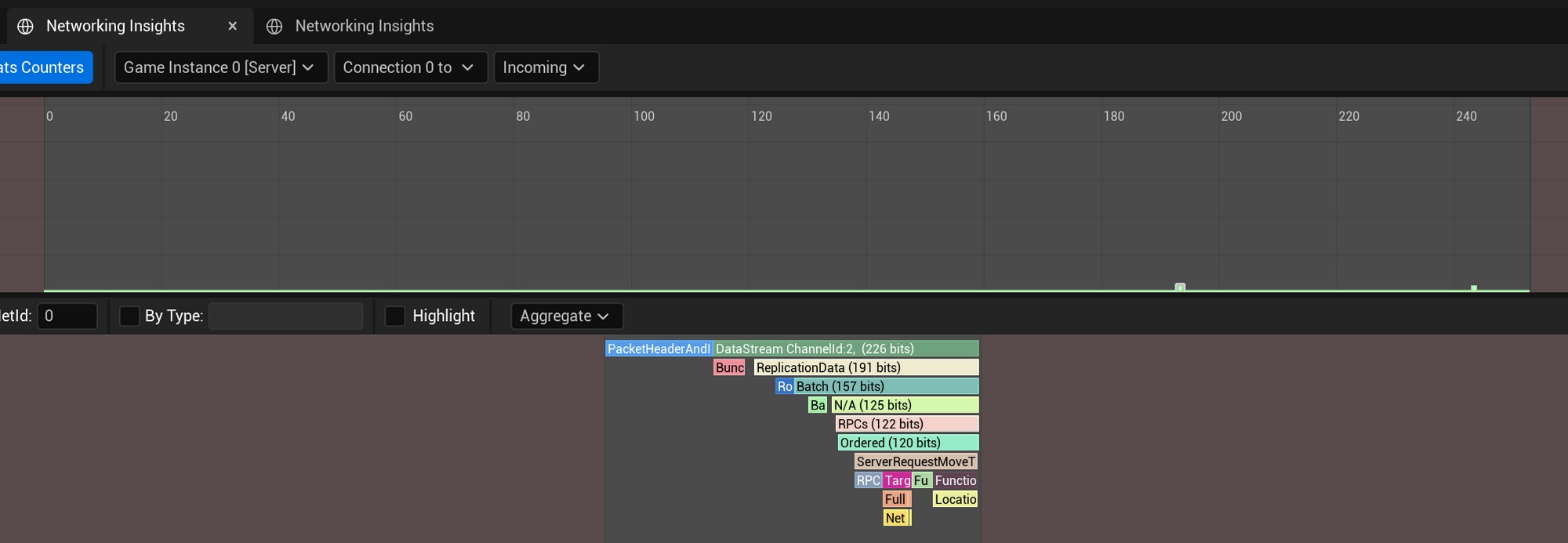
The above screenshot of incoming packets shows two small green dots that represent incoming packets. I've clicked the first one to inspect it and we can see a small block saying "ServerRequestMove", proving this is the client trying to wander.
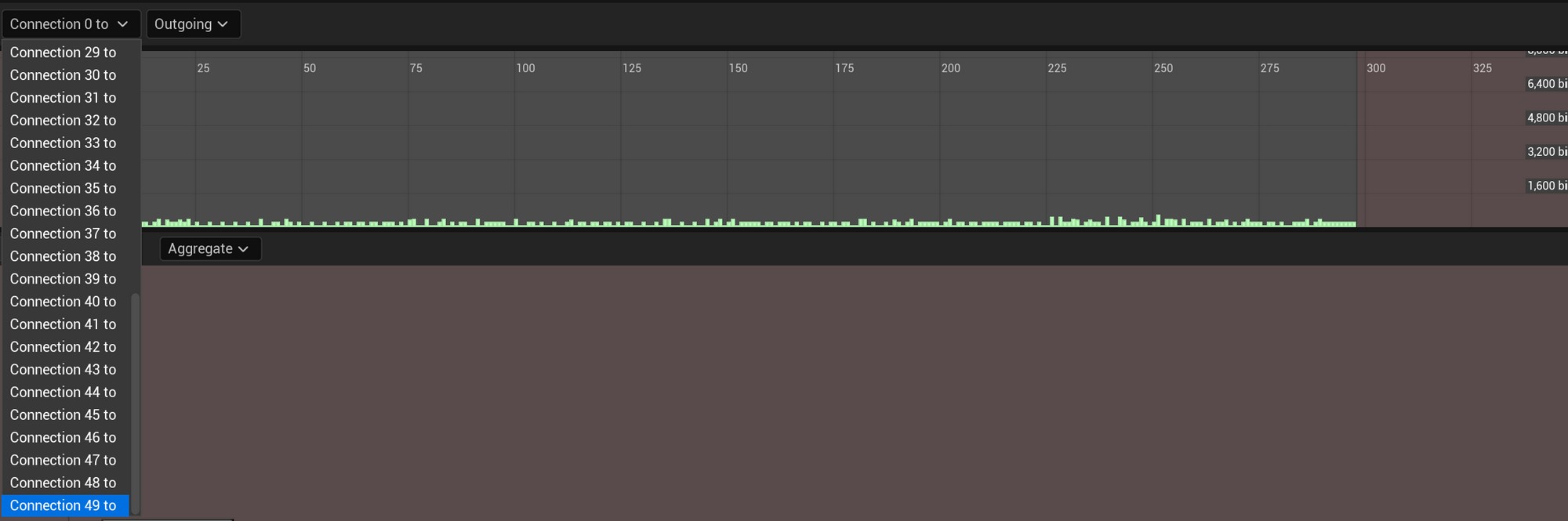
The profiler is showing 50 outgoing connections (it starts at 0) to choose from which is additional validation that 50 clients actually connected to the game server. The size of outgoing packets at a glance also look very reasonable.
A quick look at the timing insights shows us a few areas we may want to investigate.
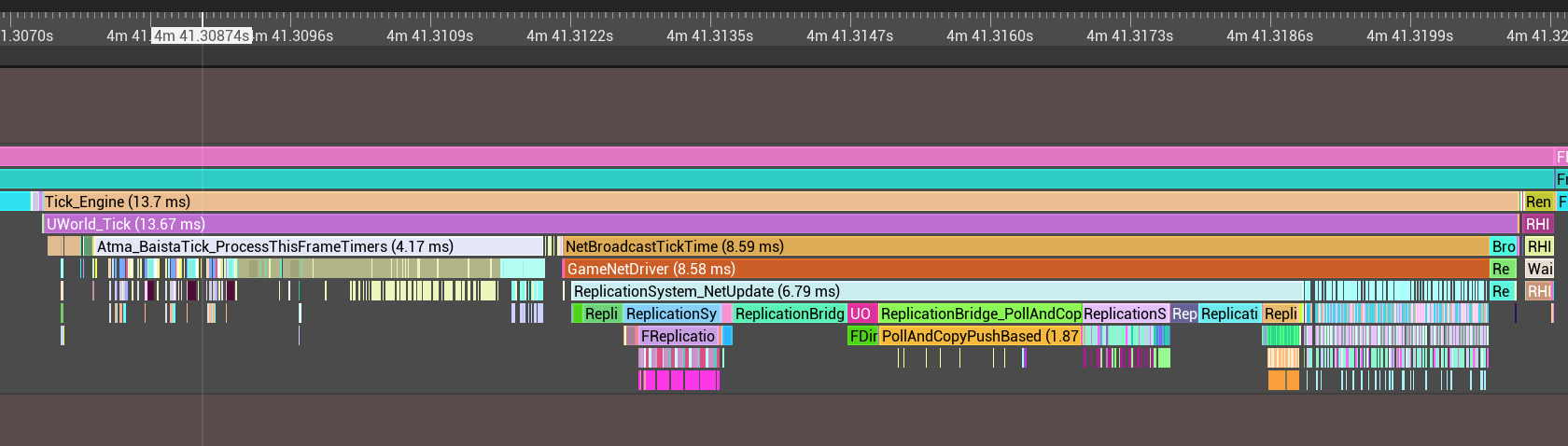
The BaistaScript system is spending a ton of time on timer logic, and our replication system has a few areas taking a hefty chunk of time. Investigating these is outside the scope of this post but it's good to have these on our radar.
Anyway, let’s have some more fun with it. Let's add another 50 clients and try to reach 100.
After adding the additional clients it’s pretty clear something went wrong. The clients with red boxes around them are showing an error and, well, they moved back to the character ready bucket instead of to the world bucket. Double clicking a client brings up the tail end of their log, which confirms the join failed and has an error code for us to look into.
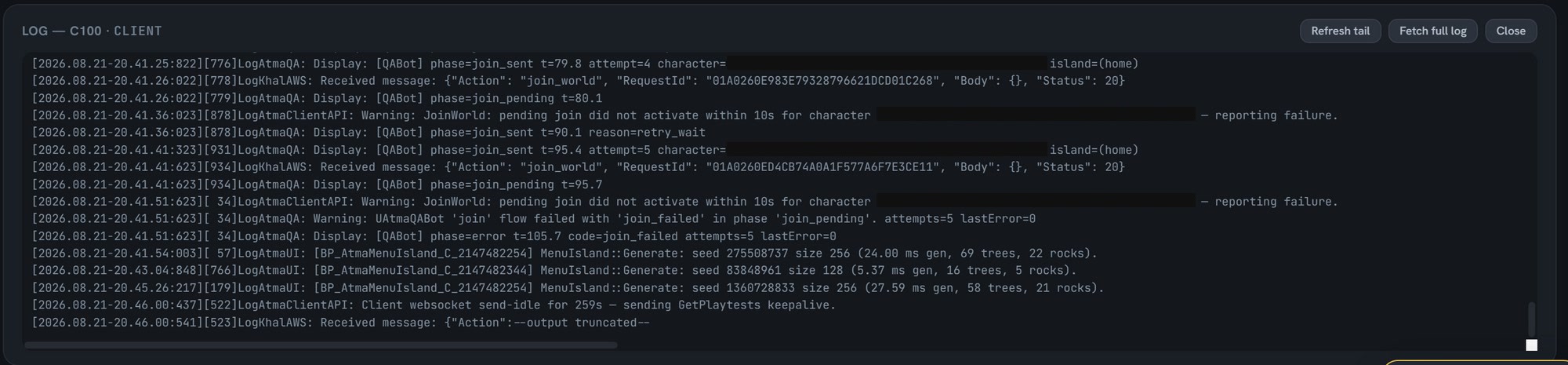
At first this seemed like a failure but on further inspection this was actually working exactly as intended. Each client was creating a fresh character which was being assigned its own personal island. The current world layout system however restricts each server to only supporting 72 personal islands each. The 28 rejected clients simply didn’t have room on that server to create an island. Sure enough, re-testing with two servers up showed successful connections across the 100 clients but split over two servers.
Splitting the clients over two servers doesn’t really let us hammer the server performance though. So I decided to leverage the join target option that allows me to spawn these test clients on an existing island instead of spawning their own.
Pushing to 100 Clients
I’m expecting performance to take a considerable hit when we have not only 50 more clients, but everyone is in the same area. If you aren’t familiar with networking performance, costs typically rise exponentially instead of linearly as nearby player count increases. This is because each additional player not only needs to be sent their own information, but every player that can see them now also needs to be sent information about them. Let’s take a look.
Looks like all 100 clients are successfully connecting to the server. Now let's see if our performance predictions were accurate.
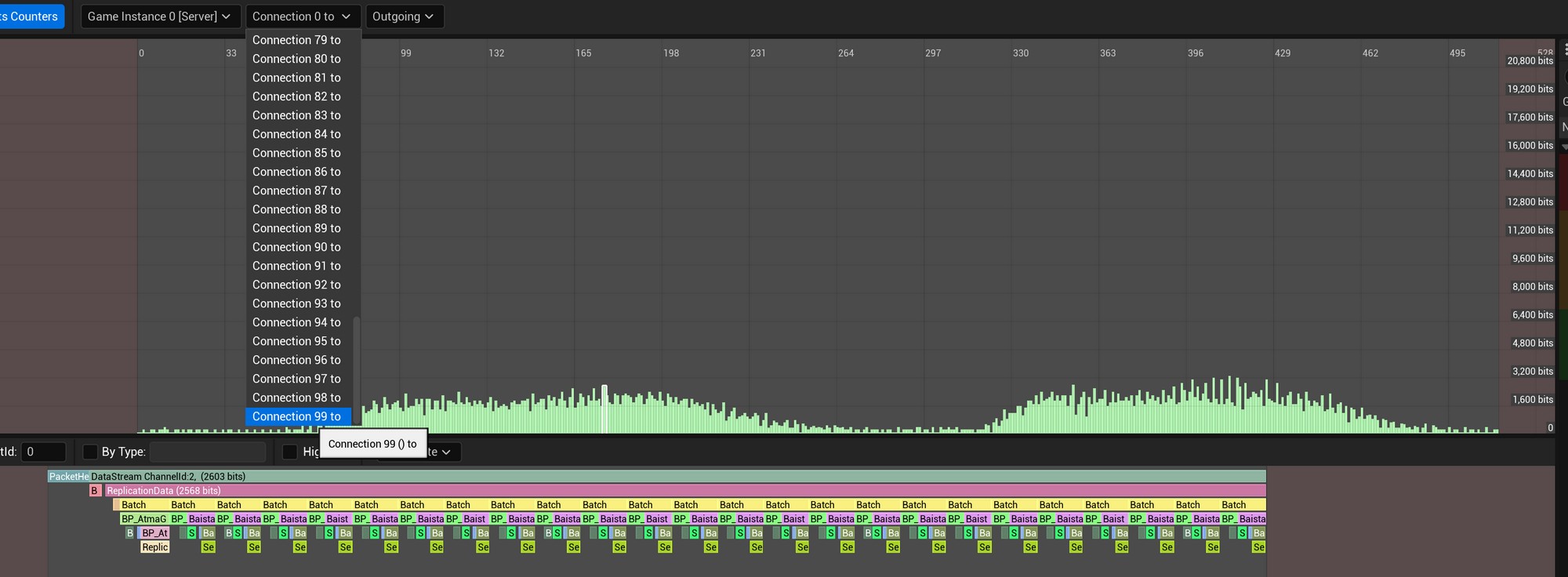
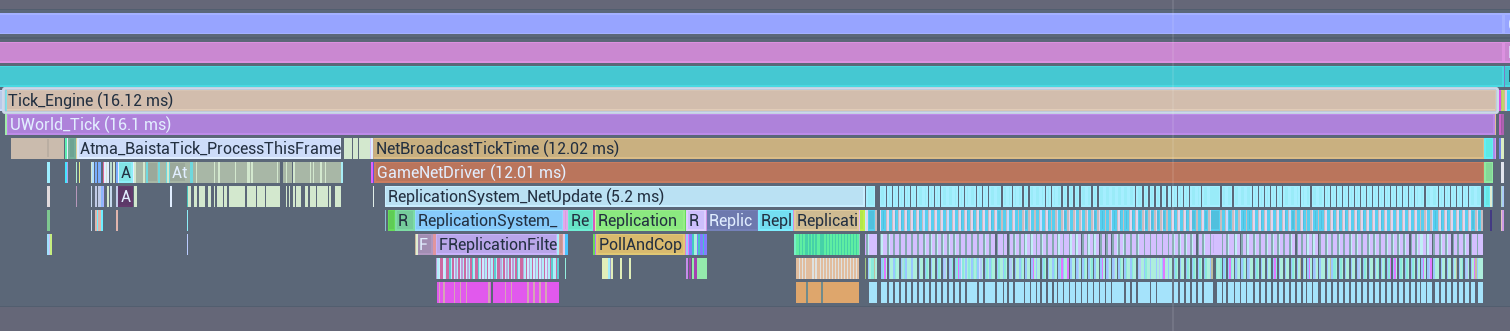
You can see very clearly where I toggled the bot behavior between wandering and idling. Wandering creates more position data to send to each client so as expected the outbound networking was significantly increased. I’ve also selected a single frame to look at the outgoing data (the bottom of the image). If I grab this same frame from the timing insights, it was certainly more expensive than our previous 50 client test. I’ll admit though, performance is looking better than I expected for our first scale test.
And for some final validation, let's take a look at our tooling. During production this will be how we get a quick overview of if there are any servers really struggling, so let's make sure the view reflects our current stress test. The first of these images is when my clients were all set to idle, while the second is when they are set to wander.


The memory difference here seems insignificant, but the outbound network jumped massively and server CPU did increase. Also my client machines seem to be hitting their limit now that things are moving around. I'll admit this is the highest outbound net usage I saw, while it typically hovered around the 280 KB/second mark. Just for a quick sanity check, I took a random section from the earlier 100 client wandering insights trace and it seems to show about 3 KB/second going out to that client. So for 100 clients, the numbers add up within reason.
Overall this is great news though. CPU and memory are the harder levers to control. Outgoing network is lower than I expected honestly and doesn't seem like it will be a long term problem, but can be an area for some cost savings.
It's worth remembering this doesn't represent real gameplay, it's simple path finding spam. We'll need to include more scale tests where we spawn tons of buildings as well as ship combat in the future. Just for fun, I thought I'd jump into the server to see what it looks like with 100 players running around. After all, numbers show the server isn't stressed. But how does it feel?
Ok that was pretty fun. And as a player I'm not seeing any issues running around the world which is awesome.
Wrapping Up
Well this is where things stand today. From here I have quite a bit to investigate and a few improvements to make on the tool. There are certainly some intermittent issues in the create character and join world flow. The performance itself looks pretty solid but there are a few packets that are being sent that can be mitigated such as AtmaGameState sending the current server time (a default Unreal behavior) and some pretty surprising metrics around my tick-based timer system. Pretty soon I’ll be adding the server auto-scaling behaviors as well, which this tool will be extremely valuable for testing. I also need to look at better ways to monitor API Gateway, Lambda, and DynamoDB during these tests. Some analytics are also pointing to concerns around the moment these 100 clients join together causing significant server stutters. While a 100 client storm is production is either a champagne problem (or a bot problem), it will be worth looking into to make sure it can't occur at lower counts as well.
It’s far from perfect but it’s already found a couple of issues for me and given me a lot more confidence in the technical approach of the project. I’ll continue to improve the tool and when I have some more exciting things to show off I’ll make another post with some more updates. In the next post maybe we'll try and push as many clients as possible before we overwhelm the server.